
Refresh Your Browser and Fix Common Issues by Clearing Out Old Data
First things first: Why should I clear my cache?
Your browser’s cache is like a junk drawer where it stores old website files to load pages faster. Over time, it can get cluttered with outdated or broken data, causing websites to act glitchy or display incorrectly. Clearing your cache gives your browser a fresh start, helping it load the newest version of the website and fixing common issues quickly.
Here's how to clear your cache depending on what device you're using:
On a PC (Chrome)
-
Open the Menu
Click on the 3-dot menu in the upper right corner of your browser.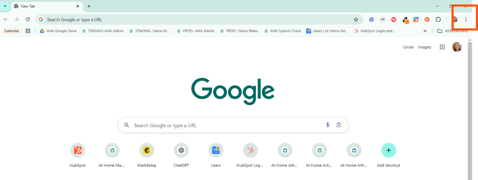
-
Go to Settings
Select "Settings" from the dropdown.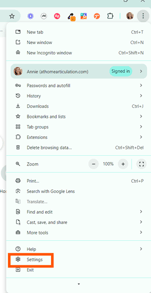
-
Find Privacy & Security
Click on Privacy and Security from the list on the left.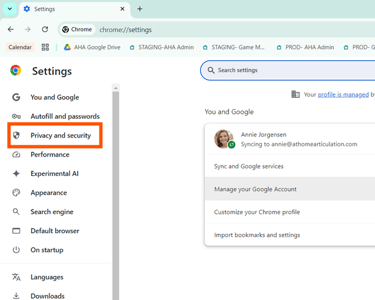
-
Delete Browsing Data
Click on Delete browsing data.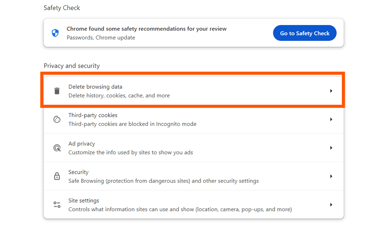
-
Choose What to Clear
In the popup, make sure Cookies and other site data and Cached images and files are both selected. Then, click Delete data.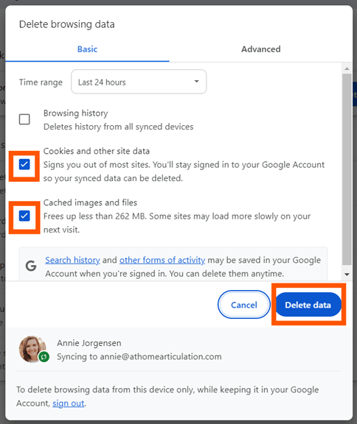
-
All Done!
Now that you’ve cleared your cache, go back to At Home Articulation and refresh the page. You’ll be prompted to log in again. Try the same task you were having trouble with—did it fix the issue? If not, don’t worry, we’ve got your back!Need Help?
If the issue persists, please reach out to our customer support by clicking the chat button in the corner of your screen, or email us at support@athomearticulation.com. We're here to help!
On a Mac (Safari)
-
Open Safari Settings
Click the Safari menu in the top-left corner of your screen.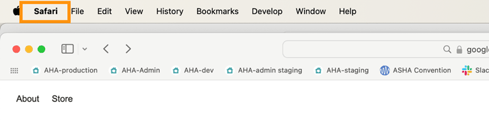
-
Go to Settings
Select Settings from the dropdown.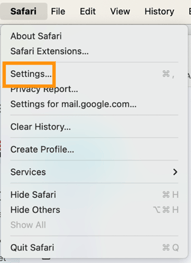
-
Navigate to Privacy
Click on the Privacy tab.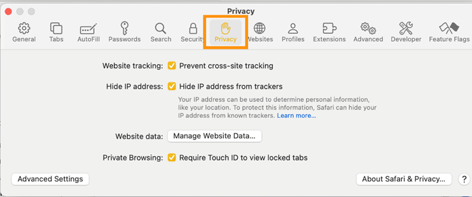
-
Manage Website Data
Click on Manage Website Data.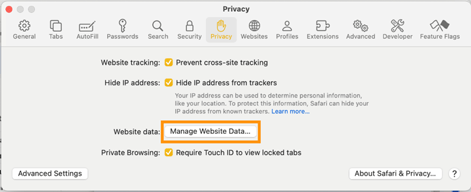
-
Remove All Data
Click Remove All and then hit Done.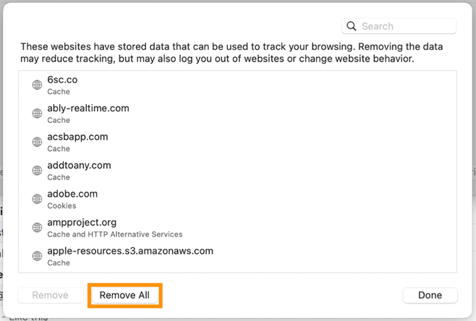
-
You're All Set!
Now that your cache is cleared, head back to At Home Articulation and refresh the page. You'll need to log in again. Try the task that was causing issues—did it work now? If not, we're here for you!Need Help?
If the issue continues, please reach out to customer support by clicking the chat button in the corner of your screen, or email us at support@athomearticulation.com. We're happy to assist you!
Why Clear Your Cache?
Clearing your cache is like giving your browser a fresh start. It helps fix issues like broken or outdated website data and speeds up your browsing experience by making sure you’re always getting the most up-to-date content.
We hope this helps! Happy browsing and don’t hesitate to reach out if you need anything. We're here to help you! 💻✨